
It has been too long since the last Hollowlight devlog, but the delay has been useful.
The first version of Hollowlight taught me a lot, but it also became overloaded with systems, stats, and logic that were not always helping me learn or move the project forward. I had built too much under the hood before the core experience was clear.
So I made the decision to restart from scratch.
This new version of Hollowlight is still being built in Unreal using Blueprint, which has been an invaluable way for me to learn game logic as a visual designer and solo developer. The goal this time is not to make the most complex version of the game possible. The goal is to build a cleaner, more focused version that I can actually finish.
After rebuilding the core systems, it also became clear that I would need art assets sooner rather than later. That pushed me into learning more Blender, with a focus on modeling, coloring, rigging, and animating the strange creatures the player will face in a way that feels achievable for one person. Fortunately I have a background in 3D art so this isn’t the hurdle it would be for a lot of solo devs, but it’s been a while since I’ve used those skills and I’m not as familiar with Blender as some other 3D tools so it took a little ramp-up time to get going.
That art pipeline will probably be the subject of the next devlog. For now, this update is about what is currently working under the hood in Hollowlight 2.0.
Building a Cleaner User Interface
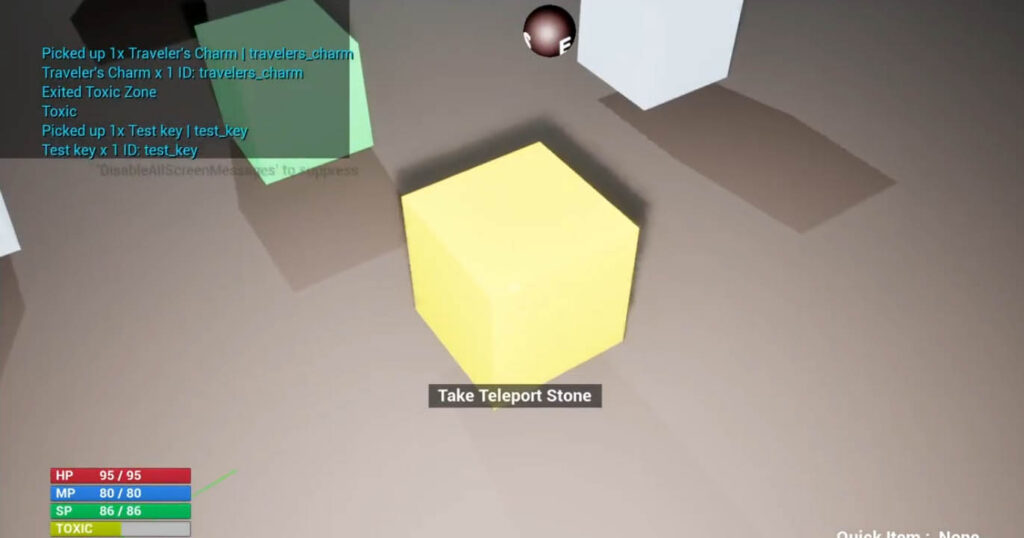
One of the first UI features I wanted was a 3D compass that moves with the player. It shows not only the direction the player is facing, but also whether they are looking up or down.
Light, darkness, and spatial awareness are major parts of Hollowlight, so I want the player to feel grounded in the dungeon without relying on a modern minimap.
The compass is built from a 3D object in the scene: a compass orb that rotates based on the player’s view direction. A camera captures that object and projects it as a texture at the top of the screen.
I also added the core player HUD elements:
- Health
- Mana
- Stamina
- Toxic buildup
- Quick-item display text
The toxic buildup bar fills as the player is exposed to certain hazards. Once full, the player becomes poisoned and starts losing health over time until they cure it. Toxic damage can come from traps, environmental hazards, and specific enemy types.
Inventory, Items, and Warding Statues
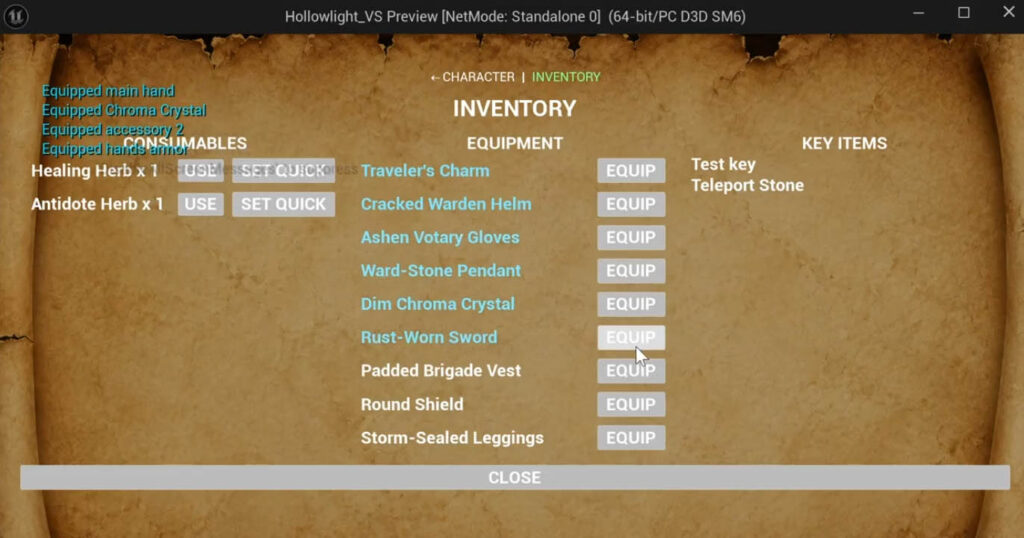
Hollowlight now has temporary text-based menus for inventory and character information.
Items are sorted into categories automatically:
- Consumables, such as healing items
- Equipment, such as weapons and armor
- Key items, used for progression or special systems
Consumables can be assigned to a quick-item slot for easy use. Some key items can also use this system.
One of the most important key items currently implemented is the Teleport Stone.
The Teleport Stone acts as a limited fast-travel tool. It works alongside Warding Statues, which serve as sanctuary points throughout the dungeon. When the player finds a Warding Statue, they can attune the Teleport Stone to that location. Using the stone later will return them to the attuned statue.
As a solo developer, I do not expect Hollowlight to become large enough to need a full fast-travel system. Still, I want the game to be somewhat forgiving. The Teleport Stone gives the player a way to retreat without making traversal feel trivial. If the game grows, I can expand the system with additional stones or limitations.
Warding Statues also restore part of the player’s health and mana, while clearing toxic buildup and poison. For now, recovery is capped at around 40%. The intention is to give the player enough relief to keep going, without completely removing the danger of nearby encounters.
Eventually, Warding Statues will also function as save points and places where the player can manage their active spells.
Character Stats, Equipment, and Leveling
The inventory menu now supports equipping items through simple text buttons. The final interface may change, but the current version works: equipped item text turns blue, and equipping a new item replaces the old one in that slot.
Accessories were a useful challenge. Hollowlight allows two accessory slots for the same item type, which was a little more complicated to set up as someone still learning Blueprint. It is working now.
The character sheet displays the kind of information expected in an RPG, including:
- Level
- Class
- Health, mana, and stamina
- Base attributes
- Derived stats
- Equipped items
- XP needed to reach the next level
Leveling is also functional. When the player gains enough XP, their stats and resource pools increase based on their chosen starting class.
The three classes do not create radically different characters, but they do let the player lean toward physical combat, spellcasting, or a balanced approach. Even a small amount of choice matters to me in RPGs, so I want that decision to feel meaningful here.
Stats are divided into two categories: base attributes and derived stats. Base attributes define the character’s foundation, while derived stats are calculated from a combination of attributes and equipment.
Revealing Secrets in the Dungeon
One system I forgot to show in the video is the secret-reveal system.
Certain hidden symbols can appear throughout the dungeon to mark illusion walls or dangerous areas. These symbols can be revealed for a limited time by casting a spell or using a specific item.
The player can still discover secrets without this help, but the system gives completion-focused players another tool if they want to make sure they have searched an area thoroughly.
Combat Systems and Enemy Testing
Combat is still being tested with placeholder cube enemies, but each enemy type now behaves differently.
Current enemy test features include:
- Different health pools
- Light and heavy attacks
- Attacks that drain stamina when blocked
- Physical, elemental, and arcane projectiles
- Damaging auras
- Hit-flash feedback when enemies take damage
I have not pushed combat too far yet because I am now working on first-person arm animations and the first real enemy. Once those are in place, combat should start to feel much closer to the final direction.
Stamina is also becoming a more important part of the game. Sprinting drains stamina over time, and stamina begins recovering after a short delay once the player stops sprinting or blocking.
Some equipment also has a stamina reserve cost. This reduces the player’s maximum usable stamina while the item is equipped. Heavier armor may offer better protection, but it limits how much stamina the player can actively use. This creates a trade-off, especially for players who want to focus on melee combat.
Next Steps for Hollowlight
Rebuilding Hollowlight from scratch was the right call.
The new version is cleaner, more focused, and easier to expand. The major systems are now in place, and I feel close to being ready to build a full test level.
Before that can happen, I need to finish establishing the visual style. The next challenge is finding an art direction that lets me create enemies, weapons, environments, and animations without getting stuck on overly detailed models.
That will be the next major step: building a version of Hollowlight that is not just functional, but visually achievable.